Tufty 2040
A hackable, programmable badge with a 2.4" (320 x 240) TFT LCD colour display, powered by Raspberry Pi RP2040.
We've had a lot of requests for an LCD version of Badger 2040 so tada - meet our pal Tufty. In a nutshell, we've combined an RP2040 microcontroller with a nice, crisp LCD screen to make a snazzy, colourful programmable badge - perfect for identifying/expressing yourself at cybernetic conferences, illicit undersea research facilities or dodgy space station bars. Don't limit yourself to hanging it around your neck (or tail) though, use it as a sleek display/control panel for sensor readouts, a photo frame for digitally generated art or for making/playing small games. Perhaps you could even have a crack at making it play Doom?
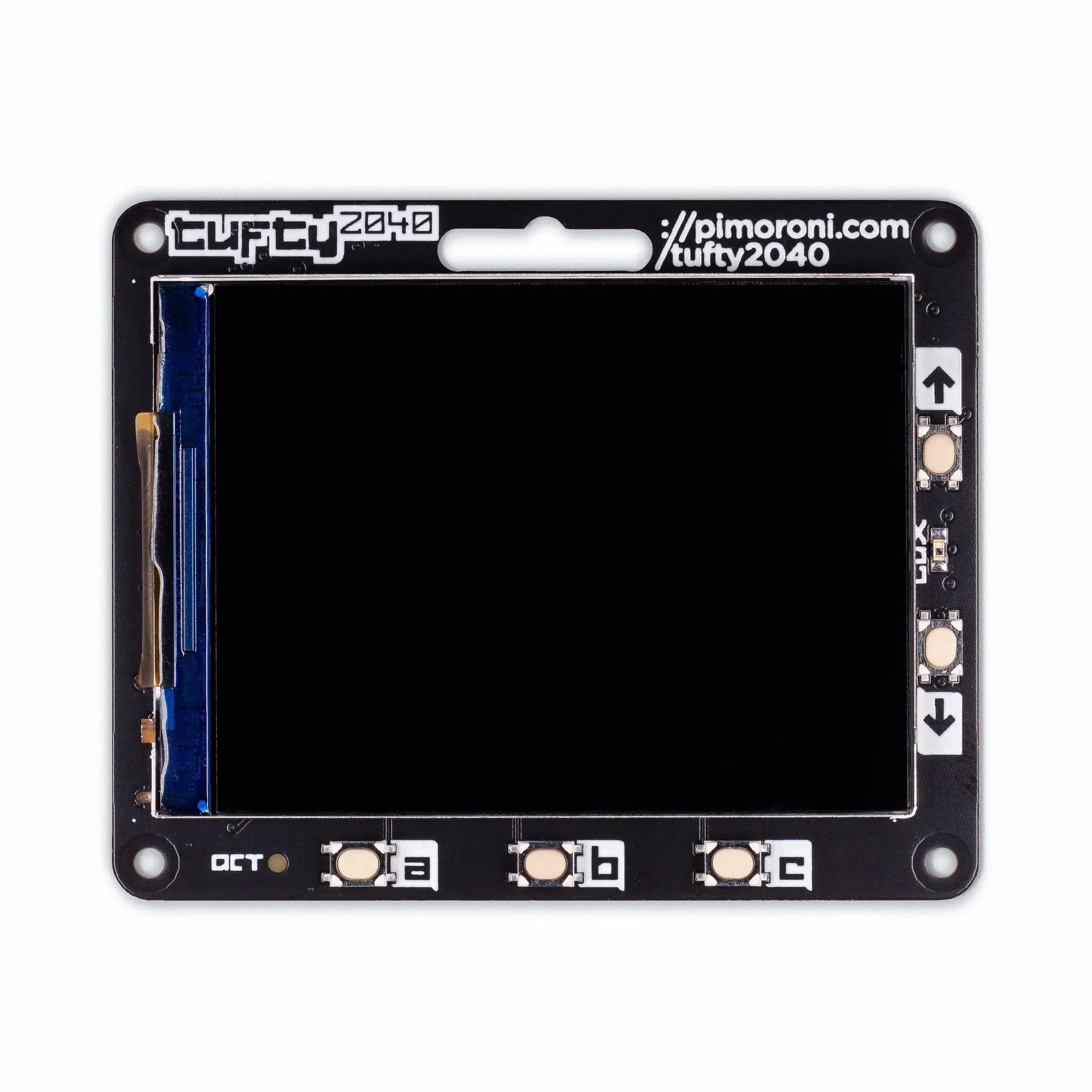
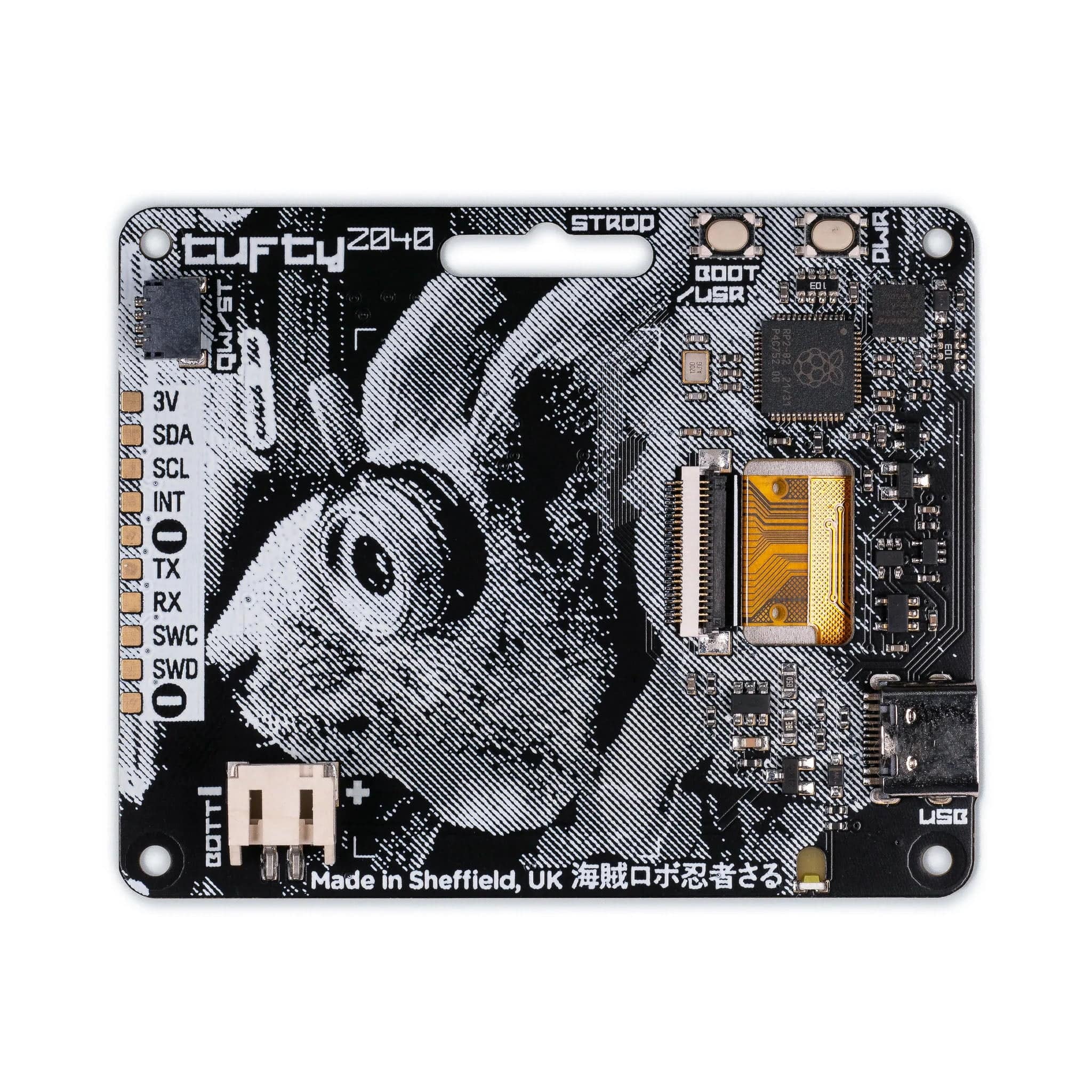
Tufty comes fully loaded with a quintet of buttons so you can easily change what's displayed on the screen, a slot so you can clip it onto a lanyard and a light-sensing phototransistor, which can be used to adjust the brightness of the screen automatically. On the back, you'll find a majestic cyberpunk squirrel, a battery connector (with a nice wide input voltage) and the usual RP2040 old chestnuts - boot and power on/off buttons and a Qw/ST connector for attaching breakouts.
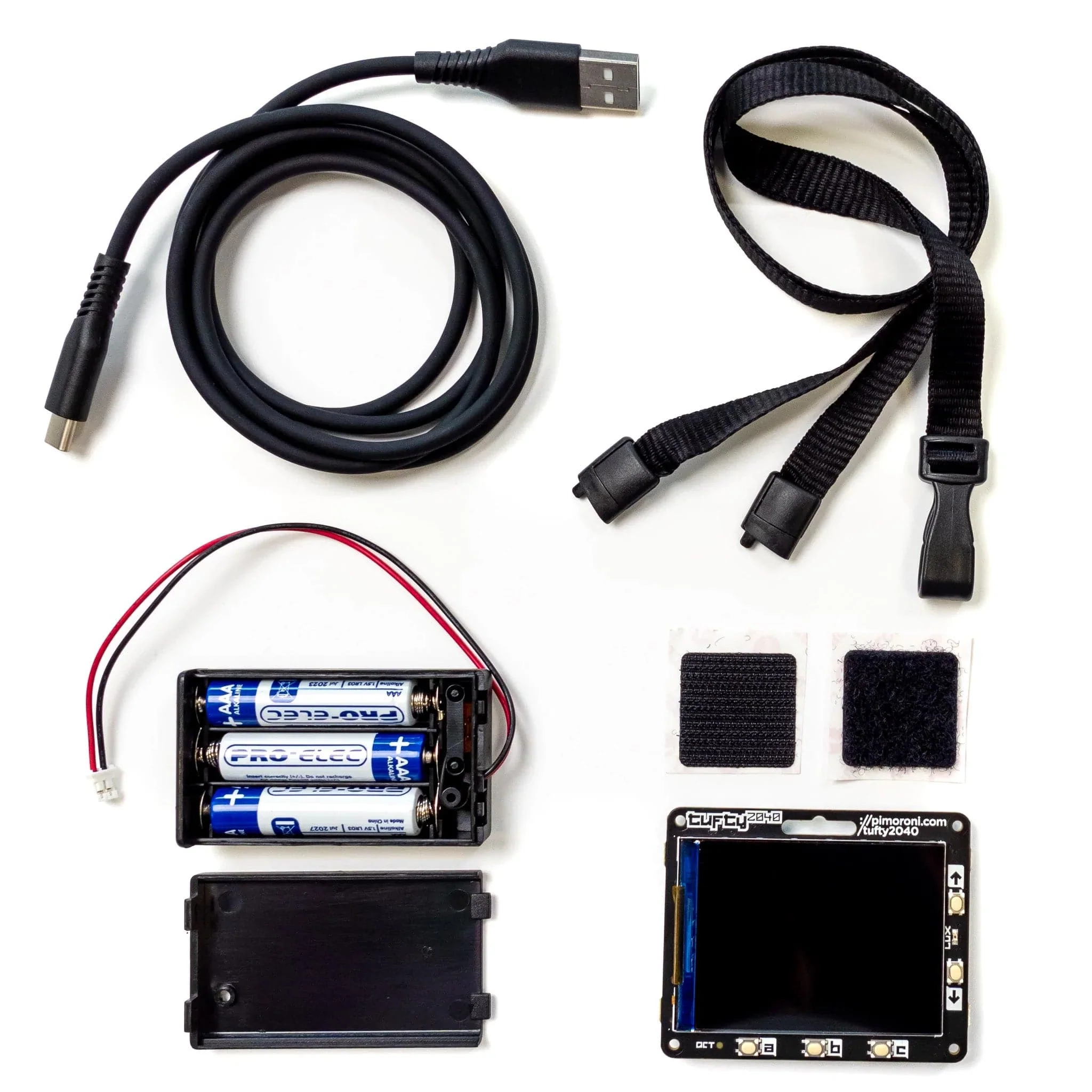
You can pick up a Tufty on its own, or for a bit more cashew can get a handy Tufty + Accessory Kit with a lanyard, AAA battery pack and USB cable. Select your desired option before adding it to your cart!
Features
- 2.4" colour IPS LCD display (320 x 240 pixels)
- Driver IC: ST7789v
- Connected via parallel
- Dimmable backlight (adjustable via PWM)
- Powered by RP2040 (Dual Arm Cortex M0+ running at up to 133Mhz with 264kB of SRAM)
- 8MB of QSPI flash supporting XiP
- Phototransistor for light sensing
- Five front user buttons
- Power and boot buttons (the boot button can also be used as a user button)
- White LED
- USB-C connector for power and programming
- JST-PH connector for attaching a battery (input range 3V - 5.5V)
- High-precision voltage reference for battery level monitoring.
- Qw/ST (Qwiic/STEMMA QT) connector
- Fully assembled (no soldering required)
- Schematic
- Dimensional drawing
- C++/MicroPython libraries
Tufty + Accessory Kit includes
- Tufty 2040
- 3 x AAA battery holder
- 3 x AAA batteries
- Velcro square
- Black lanyard (made from recycled plastic bottles!)
- USB-C to USB-A cable
Software
You can program Tufty with C/C++ or MicroPython. You'll get the best performance using C++, but if you're a beginner we'd recommend using our batteries included MicroPython build for ease of getting started. We've preloaded Tufty with a demo reel of fun examples to show you what it can do!
- Download Pirate brand MicroPython (special Tufty edition)
- Getting Started with Tufty 2040
- C++ examples
- MicroPython examples
- PicoGraphics function reference
The display functions in our new improved PicoGraphics library have been given a glow up - be sure to check them out! You can now:
- render JPEGs
- display QR codes
- draw weird polygonal shapes
- import sprites from a spritesheet
- use custom colour palettes (saving valuable RAM)
CircuitPython support is coming soon!
Connecting Breakouts
The Qw/ST connector on Tufty 2040 makes it super easy to connect up Qwiic or STEMMA QT breakouts. If your breakout has a QW/ST connector on board, you can plug it straight in with a JST-SH to JST-SH cable.
Breakout Garden breakouts that don't have a Qw/ST connector can be connected using a JST-SH to JST-SH cable plus a Qw/ST to Breakout Garden adaptor. Want to use multiple breakouts at the same time? Try this adaptor!
- List of breakouts currently compatible with our C++/MicroPython build.
Notes
- Measurements: 65.2mm x 52.7mm x 9.6mm (L x W x H, including connectors). The mounting holes are M2 and 2.9mm in from each edge. The corner radius is 3mm.
- We've designed Tufty 2040 to be accommodating about input voltage (3V - 5.5V), so it's possible to use a variety of different batteries and battery packs. We'd recommend using a 3x AAA battery pack which should give you maximum juice whilst still fitting behind Tufty nicely.
- A 2x AAA battery pack will only work well if you use non-rechargeable batteries - the voltage from 2 rechargeable (NiMH) batteries (2.4V) is just not enough for the screen.
- Tuftys are hungrier than Badgers! Power consumption is around 80mA for the screen (at full brightness) and 20mA for the RP2040 - so 100 mA total. Tufty has a toggle power on/off button (instead of a reset button) to make it easy to turn it off to preserve power, and setting the backlight to dim/turn off automatically will also make your batteries last much longer.
- Alternatively, you can plug a LiPo/LiIon battery into the battery connector, with the following caveats. Please only consider this if the person wearing the badge is an adult and knows what they're doing with LiPos!
- A solid enclosure or backplate to protect the battery from damage whilst being worn is a very good idea
- There's no battery protection included on Tufty 2040, so you should only use it with LiPo batteries that include internal protection.
- Unlike some of our other boards, Tufty 2040 doesn't have battery charging circuitry onboard. You'll need an external LiPo charger to charge the battery (like a LiPo Amigo).
- Sciurus Cybernetics employees should be careful when eating their last nut, in order to avoid kernel panic.
Original: $32.68
-70%$32.68
$9.80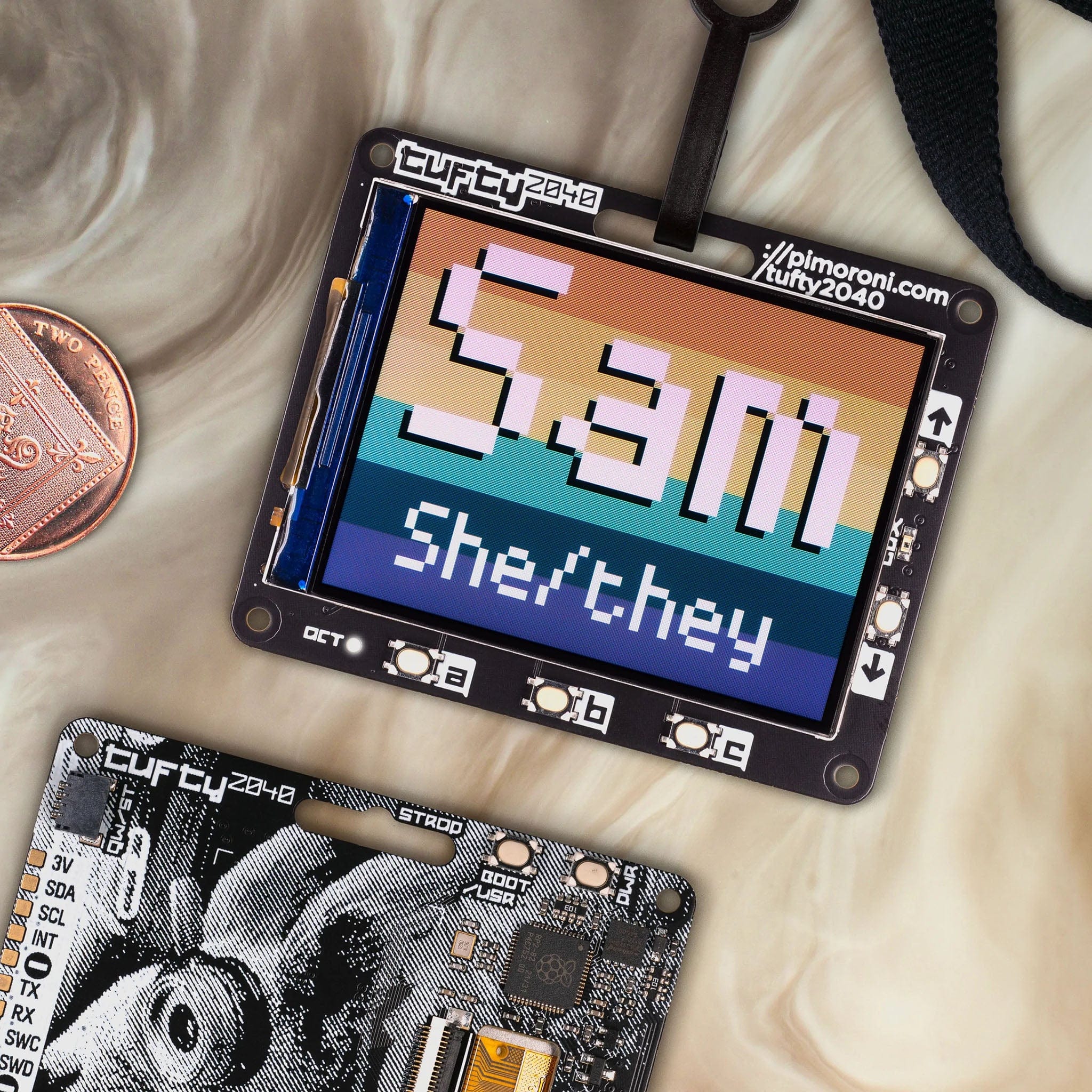
Description
A hackable, programmable badge with a 2.4" (320 x 240) TFT LCD colour display, powered by Raspberry Pi RP2040.
We've had a lot of requests for an LCD version of Badger 2040 so tada - meet our pal Tufty. In a nutshell, we've combined an RP2040 microcontroller with a nice, crisp LCD screen to make a snazzy, colourful programmable badge - perfect for identifying/expressing yourself at cybernetic conferences, illicit undersea research facilities or dodgy space station bars. Don't limit yourself to hanging it around your neck (or tail) though, use it as a sleek display/control panel for sensor readouts, a photo frame for digitally generated art or for making/playing small games. Perhaps you could even have a crack at making it play Doom?
Tufty comes fully loaded with a quintet of buttons so you can easily change what's displayed on the screen, a slot so you can clip it onto a lanyard and a light-sensing phototransistor, which can be used to adjust the brightness of the screen automatically. On the back, you'll find a majestic cyberpunk squirrel, a battery connector (with a nice wide input voltage) and the usual RP2040 old chestnuts - boot and power on/off buttons and a Qw/ST connector for attaching breakouts.
You can pick up a Tufty on its own, or for a bit more cashew can get a handy Tufty + Accessory Kit with a lanyard, AAA battery pack and USB cable. Select your desired option before adding it to your cart!
Features
- 2.4" colour IPS LCD display (320 x 240 pixels)
- Driver IC: ST7789v
- Connected via parallel
- Dimmable backlight (adjustable via PWM)
- Powered by RP2040 (Dual Arm Cortex M0+ running at up to 133Mhz with 264kB of SRAM)
- 8MB of QSPI flash supporting XiP
- Phototransistor for light sensing
- Five front user buttons
- Power and boot buttons (the boot button can also be used as a user button)
- White LED
- USB-C connector for power and programming
- JST-PH connector for attaching a battery (input range 3V - 5.5V)
- High-precision voltage reference for battery level monitoring.
- Qw/ST (Qwiic/STEMMA QT) connector
- Fully assembled (no soldering required)
- Schematic
- Dimensional drawing
- C++/MicroPython libraries
Tufty + Accessory Kit includes
- Tufty 2040
- 3 x AAA battery holder
- 3 x AAA batteries
- Velcro square
- Black lanyard (made from recycled plastic bottles!)
- USB-C to USB-A cable
Software
You can program Tufty with C/C++ or MicroPython. You'll get the best performance using C++, but if you're a beginner we'd recommend using our batteries included MicroPython build for ease of getting started. We've preloaded Tufty with a demo reel of fun examples to show you what it can do!
- Download Pirate brand MicroPython (special Tufty edition)
- Getting Started with Tufty 2040
- C++ examples
- MicroPython examples
- PicoGraphics function reference
The display functions in our new improved PicoGraphics library have been given a glow up - be sure to check them out! You can now:
- render JPEGs
- display QR codes
- draw weird polygonal shapes
- import sprites from a spritesheet
- use custom colour palettes (saving valuable RAM)
CircuitPython support is coming soon!
Connecting Breakouts
The Qw/ST connector on Tufty 2040 makes it super easy to connect up Qwiic or STEMMA QT breakouts. If your breakout has a QW/ST connector on board, you can plug it straight in with a JST-SH to JST-SH cable.
Breakout Garden breakouts that don't have a Qw/ST connector can be connected using a JST-SH to JST-SH cable plus a Qw/ST to Breakout Garden adaptor. Want to use multiple breakouts at the same time? Try this adaptor!
- List of breakouts currently compatible with our C++/MicroPython build.
Notes
- Measurements: 65.2mm x 52.7mm x 9.6mm (L x W x H, including connectors). The mounting holes are M2 and 2.9mm in from each edge. The corner radius is 3mm.
- We've designed Tufty 2040 to be accommodating about input voltage (3V - 5.5V), so it's possible to use a variety of different batteries and battery packs. We'd recommend using a 3x AAA battery pack which should give you maximum juice whilst still fitting behind Tufty nicely.
- A 2x AAA battery pack will only work well if you use non-rechargeable batteries - the voltage from 2 rechargeable (NiMH) batteries (2.4V) is just not enough for the screen.
- Tuftys are hungrier than Badgers! Power consumption is around 80mA for the screen (at full brightness) and 20mA for the RP2040 - so 100 mA total. Tufty has a toggle power on/off button (instead of a reset button) to make it easy to turn it off to preserve power, and setting the backlight to dim/turn off automatically will also make your batteries last much longer.
- Alternatively, you can plug a LiPo/LiIon battery into the battery connector, with the following caveats. Please only consider this if the person wearing the badge is an adult and knows what they're doing with LiPos!
- A solid enclosure or backplate to protect the battery from damage whilst being worn is a very good idea
- There's no battery protection included on Tufty 2040, so you should only use it with LiPo batteries that include internal protection.
- Unlike some of our other boards, Tufty 2040 doesn't have battery charging circuitry onboard. You'll need an external LiPo charger to charge the battery (like a LiPo Amigo).
- Sciurus Cybernetics employees should be careful when eating their last nut, in order to avoid kernel panic.